







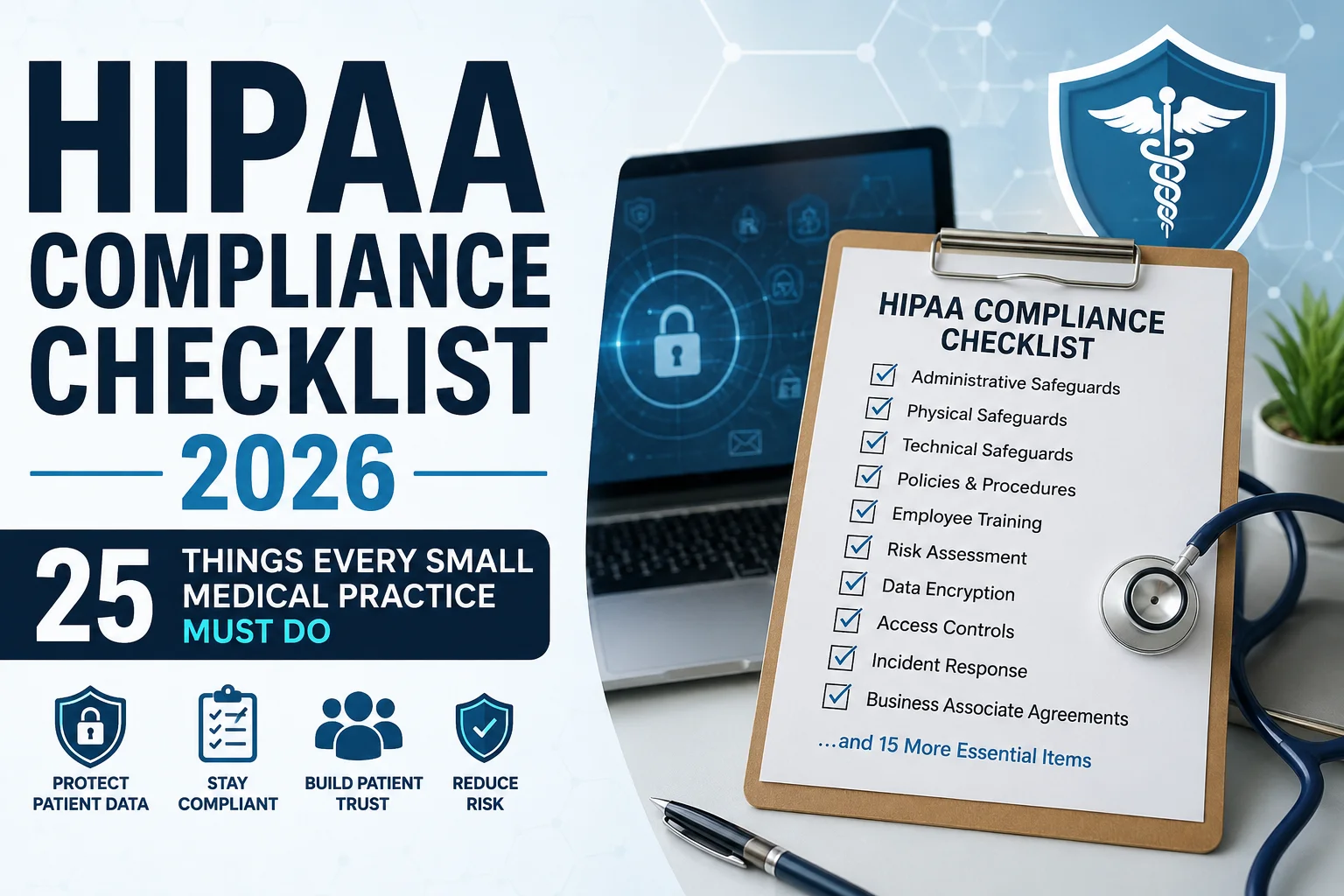
HIPAA Compliance Checklist 2026 | 25 Things Every Small Medical Practice Must Do
HIPAA Compliance Checklist 2026 — Why This Year Is Different
Most small medical practices think of HIPAA the same way they have thought about it for the past twenty years. Put a lock on the file room. Train the staff once a year. Sign a business associate agreement with the EHR vendor. Move on.
That approach was never quite enough. In 2026, it is not even close.
The HIPAA Security Rule has not seen a significant update since it was first introduced in 2003. That changed in 2026. The new Security Rule amendments eliminate the distinction between “required” and “addressable” safeguards. Encryption is now mandatory. Multi-factor authentication is mandatory. Annual security risk assessments are mandatory. Penetration testing is mandatory. Business associate verification is mandatory.
And here is the number that makes this feel real: HIPAA violation penalties in 2026 range from $141 to $2,134,831 per violation category per year. The Office for Civil Rights enforced over $4.2 million in HIPAA penalties in 2024 alone.
Small medical and dental practices accounted for 55 percent of OCR financial penalties in a recent enforcement cycle. There is no small-practice exemption. A solo physician and a hospital system face the same requirements. The difference is that the hospital has an entire compliance department. Your practice has you.
This checklist gives you the specific, practical steps that every small medical practice must have in place in 2026 — organized by category, written in plain language, and updated to reflect the rule changes that are in effect right now.
From the ProHealth Care Advisors team: We support private practices with billing compliance, documentation standards, and operational guidance. Visit ProHealth Care Advisors or see our Medical Billing and Practice Management page for related support.
What Changed in HIPAA in 2026 — The Short Version
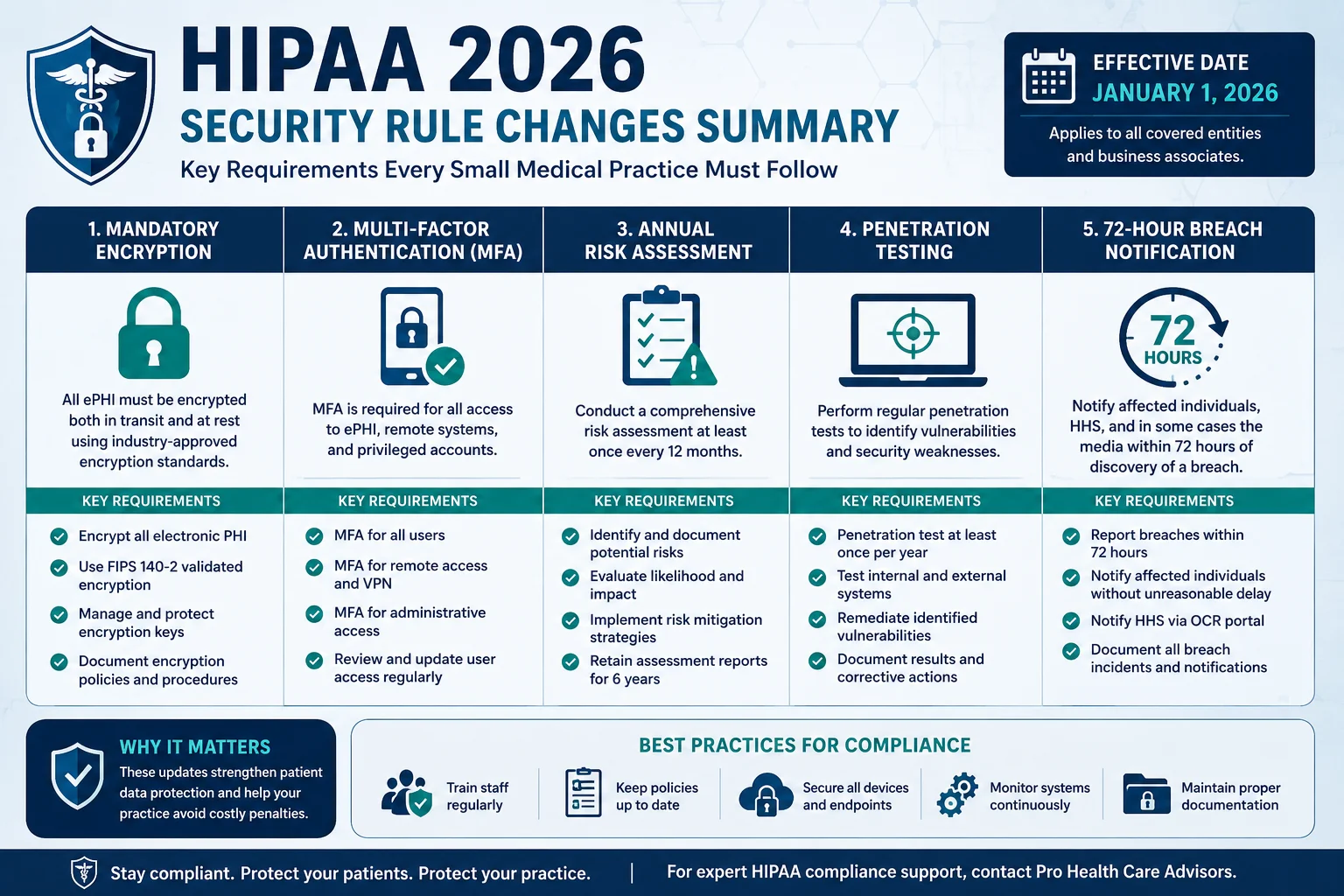
Before getting into the checklist, here is a quick summary of the 2026 changes so you understand why certain items are now non-negotiable where they were previously optional.
The “addressable vs. required” distinction is gone. The original 2003 HIPAA Security Rule divided safeguards into “required” (must implement) and “addressable” (implement if reasonable, or document why not). The 2026 Security Rule update eliminates this distinction. Encryption, MFA, penetration testing, audit logging, and business associate verification all become mandatory — no exceptions, no documentation workarounds.
Encryption is now required at rest and in transit. Any system handling electronic protected health information (ePHI) must encrypt that data both when stored and when transmitted. Laptops, mobile devices, cloud storage, email systems, and EHR databases all require encryption — not just recommended to have it.
Multi-factor authentication is mandatory. Every system that accesses ePHI must require multi-factor authentication. A username and password alone no longer meets the 2026 standard.
Annual security risk assessments are required. Practices that relied on basic security measures and periodic — meaning every few years — risk assessments now need to conduct them annually, documented with action plans for every gap found.
Penetration testing is required. Regular technical testing including network vulnerability scanning and penetration testing is now a required safeguard, not a recommended best practice.
72-hour breach notification to OCR is required. The 2026 Security Rule amendments introduce a 72-hour window for notifying OCR of qualifying breaches — significantly tighter than previous standards for smaller practices.
Notice of Privacy Practices updated February 16, 2026. A new section must be added to existing Notices of Privacy Practices regarding reproductive health care information. The compliance date was February 16, 2026. If your NPP has not been updated since that date, you have a current gap.
The 25-Point HIPAA Compliance Checklist for Small Medical Practices 2026
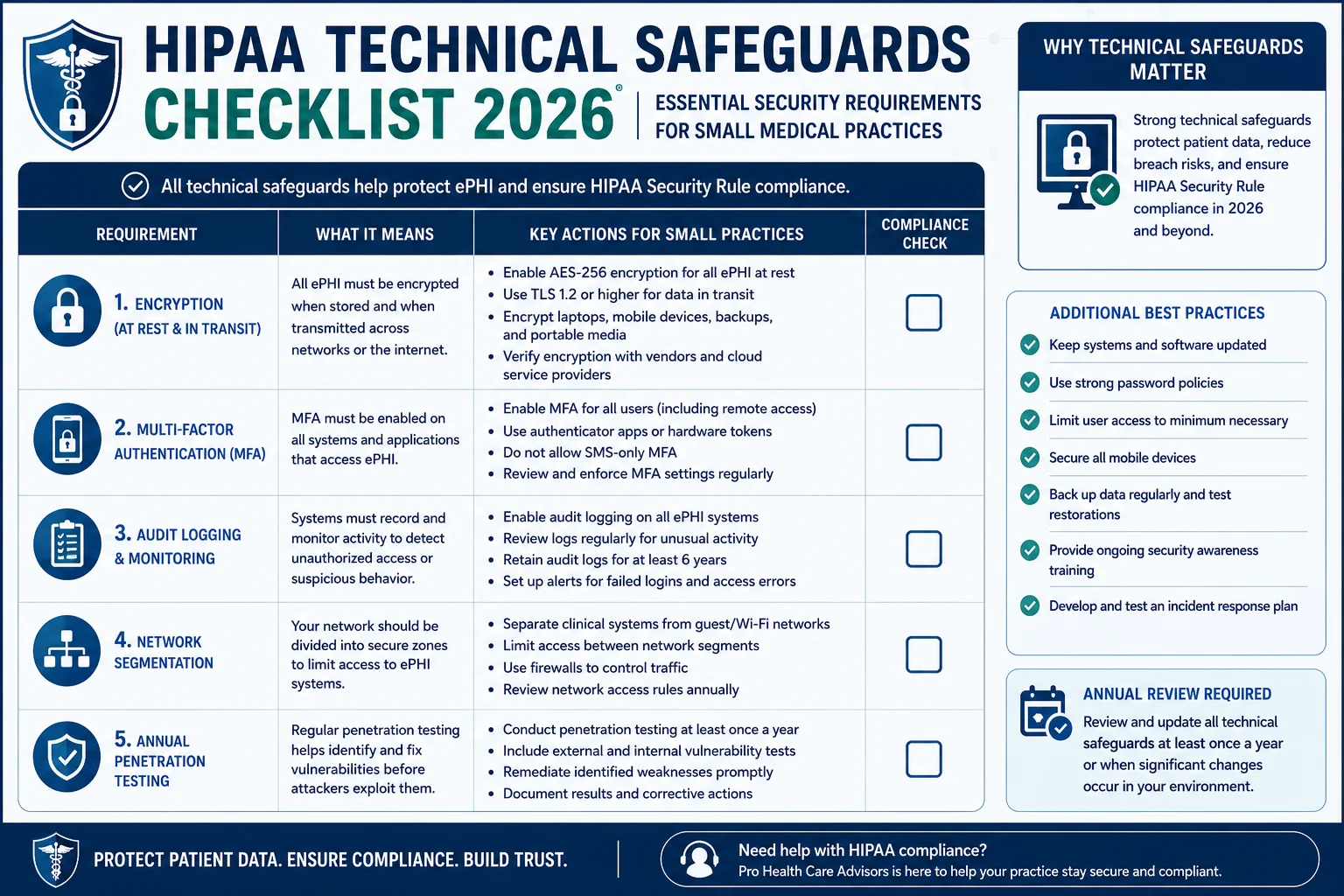
Organized into five categories matching how OCR investigates compliance. Work through each section against your current practice.
CATEGORY 1 — Administrative Safeguards (Items 1–7)
These are the policies, people, and processes accountable for HIPAA compliance inside your practice. Most OCR enforcement actions trace back to failures here.
✅ Item 1 — Conduct an Annual Security Risk Assessment
This is the single most commonly cited gap in OCR enforcement actions against small practices. A Security Risk Assessment identifies where ePHI lives in your practice, what threats exist, how likely those threats are, and what gaps exist in your current protections. Under 2026 rules, this must happen every year — not once when you open your practice and never again.
Document the assessment, document your findings, and document the steps you took to address each gap. The documentation matters as much as the assessment itself.
External resource: HHS — Security Risk Assessment Tool for Small Practices
✅ Item 2 — Designate a HIPAA Privacy Officer and Security Officer
Every covered entity — including a solo practice — must have a named Privacy Officer responsible for Privacy Rule compliance and a named Security Officer responsible for the Security Rule. In a small practice, these can be the same person. But it must be a specific, designated individual — not “whoever is available.” Document the designation in writing and include it in your staff handbook.
✅ Item 3 — Maintain Updated Written Policies and Procedures
Your HIPAA policies must be written, current, and accessible to all staff. This includes your privacy policy, security policy, breach response procedure, access control policy, and sanctions policy. “Updated” in 2026 means reviewed annually and revised whenever you change systems, hire significant new staff, add new services, or a rule change takes effect. The February 2026 NPP update is a clear example — many practices missed it.
✅ Item 4 — Conduct HIPAA Training for Every Staff Member Annually
Every member of your workforce — front desk, medical assistants, billing staff, contractors with PHI access — must receive HIPAA training when they join and annually thereafter. Training must cover what PHI is, how to protect it, what to do when a breach occurs, and what the consequences of violations are.
Document the training. Record who was trained, what was covered, and when. OCR will ask for this documentation during any investigation. Training that happened but was not documented provides no protection.
✅ Item 5 — Sign Business Associate Agreements with Every Vendor That Touches PHI
Any vendor that creates, receives, maintains, or transmits PHI on your behalf requires a signed Business Associate Agreement. This includes your EHR vendor, billing service, cloud storage provider, transcription service, answering service, and IT support company.
In 2026, your existing BAAs must be reviewed to confirm they reflect the new Security Rule requirements. BAAs signed before 2024 may not include the required provisions around encryption, MFA, and incident notification timelines. OCR now scrutinizes BAA currency and completeness as a standard part of investigations. The $16 million Anthem settlement and $6.85 million Premera settlement both involved business associate failures.
✅ Item 6 — Implement a Written Sanctions Policy for HIPAA Violations
Your practice must have a written policy specifying consequences for staff who violate HIPAA — from minor infractions to serious breaches — and that policy must be applied consistently. Individual staff members can face criminal penalties from the DOJ including fines up to $250,000 and up to 10 years in prison for knowingly violating HIPAA. Your team needs to understand this clearly.
✅ Item 7 — Maintain a HIPAA Compliance Documentation File
Every policy, training record, BAA, risk assessment, and breach log must be documented and retained. HIPAA requires covered entities to keep compliance documentation for six years from creation or last effective date. Your documentation is your defense during an OCR investigation. Practices that cannot produce it are penalized for noncompliance even when they were doing the right things — because without documentation, there is no proof.
CATEGORY 2 — Physical Safeguards (Items 8–12)
Physical safeguards govern access to your facilities and equipment. These are the easiest to overlook because they feel obvious — and they are the category where small practices have the most unaddressed gaps.
✅ Item 8 — Control Physical Access to Areas Where PHI Is Stored or Accessed
Any area where patient records can be accessed — front desk, medical records storage, server room, billing station — must have controlled access. Waiting rooms must be configured so other patients cannot see screens, hear conversations about other patients, or access records. This sounds basic. OCR investigations consistently find violations here.
✅ Item 9 — Implement a Workstation Use and Security Policy
Every computer, laptop, tablet, and workstation accessing ePHI must have automatic screen locks after inactivity, screen positioning preventing casual viewing, and rules about what staff can and cannot do on work devices. In 2026, with remote and hybrid administrative work now common, this policy must also address home and remote environments where your office’s physical security controls do not apply.
✅ Item 10 — Secure Every Mobile Device That Accesses ePHI
Smartphones, tablets, and laptops accessing patient records are the most common source of device-related PHI breaches. Every such device must have encryption enabled, remote wipe capability configured, and a PIN or biometric lock active. If a staff member’s personal phone accesses the EHR, a mobile device management policy must cover that device specifically.
✅ Item 11 — Maintain a Device and Media Disposal Policy
When you replace a computer, retire a tablet, or dispose of a hard drive, the ePHI on that device must be properly destroyed — certified data wiping or physical destruction, not file deletion or factory reset. Maintain records of disposal including device serial number, disposal date, and destruction method.
✅ Item 12 — Control and Log Physical Access to Your Server or IT Infrastructure
If your practice has an on-site server, access must be physically controlled and logged. If you use a cloud-based EHR, confirm with your vendor in writing — as part of your BAA review — that their physical data center security meets HIPAA requirements.
CATEGORY 3 — Technical Safeguards (Items 13–18)
This is where the 2026 rule changes have the most direct impact. The technical requirements that were previously “addressable” are now mandatory for every practice regardless of size.
✅ Item 13 — Encrypt All ePHI at Rest and in Transit
Encryption is now a required safeguard — not optional, not addressable, not something to implement “when feasible.” Every system storing ePHI must encrypt it at rest. Every transmission of ePHI — through email, payer submission, remote access, or cloud sync — must be encrypted in transit. Confirm encryption status with your EHR vendor and document it in your BAA.
✅ Item 14 — Implement Multi-Factor Authentication on All Systems Accessing ePHI
Multi-factor authentication requires something you know (password), something you have (authentication app or device), or something you are (biometric). A username and password alone does not meet the 2026 standard. MFA must be enabled on your EHR, email system if it contains PHI, billing platform, patient portal, and any other system that stores or transmits patient information.
✅ Item 15 — Implement Role-Based Access Controls and Minimum Necessary Access
Not every staff member needs access to every part of your systems. Your front desk does not need access to clinical notes. Your medical assistant does not need access to billing records. Role-based access controls ensure each user sees only what their job requires — nothing more. Review access settings in your EHR annually. Remove access immediately when a staff member changes roles or leaves the practice.
✅ Item 16 — Maintain and Review Audit Logs on All ePHI Access
Your systems must generate and retain logs showing who accessed what ePHI, when, and from where. Review these logs monthly at minimum. Unexplained access patterns can indicate a breach or internal policy violation before it escalates to a reportable incident. The logs also provide critical evidence of compliance during an investigation.
✅ Item 17 — Conduct Vulnerability Scanning and Annual Penetration Testing
The 2026 Security Rule mandates regular technical testing. Vulnerability scanning checks for known security weaknesses in your systems. Penetration testing goes further — a qualified security professional actively attempts to breach your systems to find what automated tools miss. Annual penetration testing by a qualified third party satisfies this requirement. Document the testing, findings, and remediation steps taken.
✅ Item 18 — Implement Network Segmentation
Your patient data network must be separated from your general business network and from any public-facing networks like your waiting room Wi-Fi. If a visitor connects to an unsegmented network that carries ePHI, you have a preventable breach risk. Network segmentation is now a required safeguard under the 2026 rules — not a recommended best practice.
CATEGORY 4 — Privacy Rule Requirements (Items 19–22)
✅ Item 19 — Update Your Notice of Privacy Practices — February 2026 Deadline
A new section must be added to existing Notices of Privacy Practices regarding reproductive health care information — clarifying to patients that this information will not be used or disclosed against them. The compliance deadline was February 16, 2026.
If your NPP has not been updated since that date, you have a current compliance gap. Update the document, post it in your office, publish it on your website, and distribute it to new patients.
✅ Item 20 — Respond to Patient Record Access Requests Within 30 Days
Patients have the right to access their medical records. HIPAA requires a response within 30 calendar days. A solo dental practice was fined $30,000 for failing to provide a patient access to records within 30 days. OCR’s Right of Access enforcement initiative has produced penalties against practices of all sizes. Have a documented process for receiving, processing, and fulfilling patient record requests — and log every request with its date, response date, and outcome.
External resource: HHS OCR — Patient Right of Access Initiative
✅ Item 21 — Apply the Minimum Necessary Standard to All PHI Disclosures
When sharing patient information — with other providers, payers, or business associates — share only the minimum information necessary for the intended purpose. Do not send complete medical records when only a summary is needed. Train your staff on this standard specifically. Many inadvertent HIPAA violations in small practices come from over-sharing because it felt easier than identifying the relevant portion.
✅ Item 22 — Maintain a Log of All PHI Disclosures
Patients have the right to request an accounting of disclosures — a record of who received their PHI, when, and for what purpose. Your practice must maintain this log per patient for six years. The log must cover disclosures for purposes other than treatment, payment, and healthcare operations.
CATEGORY 5 — Breach Notification (Items 23–25)
✅ Item 23 — Have a Written Breach Response Plan Before You Need It
Every small practice needs a documented incident response plan specifying exactly what to do when a potential breach is discovered. This plan must name who is notified first, who investigates, what evidence is preserved, how affected patients are notified, and how OCR is notified within required timeframes. Practices without a written plan make significantly worse decisions in the hours after a breach — decisions that increase both the severity of the incident and the size of the resulting penalty.
✅ Item 24 — Notify OCR Within 72 Hours for Qualifying Breaches
The 2026 Security Rule amendments introduce a mandatory 72-hour window for notifying OCR of qualifying breaches. For breaches affecting fewer than 500 individuals, annual reporting to OCR remains required. But your internal response process should be immediate regardless of the number affected — the 72-hour clock starts from when you discover the breach, not when you finish investigating it.
External resource: HHS OCR — How to Report a HIPAA Breach
✅ Item 25 — Notify Affected Patients Without Unreasonable Delay
When a breach of unsecured PHI occurs, affected patients must be notified without unreasonable delay and within 60 calendar days of discovery. The notification must describe what happened, what type of PHI was involved, what the practice is doing to address it, and what steps patients can take to protect themselves.
Breach notification costs average $3 to $5 per affected individual — plus forensic investigation fees from $50,000 to $500,000 or more, legal defense costs, and OCR penalties on top. The total cost of a breach handled poorly is orders of magnitude higher than the cost of the compliance program that would have prevented it.
What Happens When Small Practices Get It Wrong — Real Numbers
OCR does not exempt small practices. A solo dental practice was fined $30,000 for missing a 30-day patient access deadline. A small dermatology practice paid $150,000 for impermissible disclosure of PHI on social media.
The 2026 penalty structure has four tiers:
| Tier | Cause | Per-Violation Annual Cap |
|---|---|---|
| Tier 1 | Did not know, could not have known | $36,505 |
| Tier 2 | Reasonable cause, not willful neglect | $146,053 |
| Tier 3 | Willful neglect, corrected within 30 days | $365,052 |
| Tier 4 | Willful neglect, not corrected | $2,134,831 |
A single breach can involve multiple violation categories — privacy, security, and breach notification — each penalized separately. Combined with state attorney general actions, total penalties for one incident can exceed $10 million for a practice of any size.
Practices that end up in Tier 3 and 4 are almost always the ones that knew compliance gaps existed and chose not to address them. That is the scenario this checklist is designed to prevent.
4-Week Implementation Plan — How to Work Through This Checklist
The 25 items above are designed to be worked through systematically. Here is a practical week-by-week approach:
Week 1 — Administrative foundation. Designate Privacy and Security Officers. Confirm all BAAs are current and updated for 2026 requirements. Schedule your annual Security Risk Assessment if not yet done this year.
Week 2 — Privacy Rule housekeeping. Update your Notice of Privacy Practices if not updated since February 2026. Confirm your patient record access process has a documented 30-day timeline. Review and update your disclosure log.
Week 3 — Technical safeguards audit. Work through Items 13–18 with your IT support or EHR vendor. Confirm encryption status, MFA enablement, access controls, audit log functionality, and network segmentation.
Week 4 — Physical safeguards review and breach planning. Walk through your office with the physical safeguards list. Review and update your written breach response plan. Confirm your 72-hour OCR notification process is documented.
Ongoing — Training, audits, documentation. Annual staff training with records. Quarterly compliance calendar review. Monthly audit log review. BAA review whenever you add a new vendor.
For practices that need support working through this process, our Revenue Cycle and Practice Management Services include operational compliance guidance for private practices.
Georgia Private Practices — HIPAA Plus State-Level Requirements
Georgia private practices operate under HIPAA’s federal baseline plus Georgia-specific health data protections. The Georgia Computer Systems Protection Act and the Georgia Personal Identity Protection Act add requirements around breach notification timelines and data security that run parallel to HIPAA’s federal framework.
For Georgia practices, the most relevant state-and-federal intersection in 2026 is breach notification timing. Georgia law may require faster patient notification than HIPAA’s 60-day federal window depending on the nature of the breach and the data type involved. Know both timelines.
Additionally, Georgia Medicaid’s GAMMIS portal — covered in our Georgia Medical Billing Guide — has its own access control and authentication requirements that must be met alongside HIPAA’s technical safeguards. These are not duplicative — they are parallel obligations.
External resource: Georgia Secretary of State — Personal Information and Data Security
Frequently Asked Questions — HIPAA Compliance Checklist 2026
Do small medical practices really get penalized for HIPAA violations?
Yes — with no size exception. OCR has penalized solo practitioners, small clinics, and individual providers. Small practices represent a disproportionate share of enforcement actions because they are more likely to have compliance gaps than large systems with dedicated compliance infrastructure. OCR’s Risk Analysis Initiative has produced enforcement actions against practices with as few as one provider.
What is the most common HIPAA violation in small practices?
The most commonly cited violations are failure to conduct a Security Risk Assessment, lack of encryption, insufficient access controls, and delayed breach notification. Missing or outdated Business Associate Agreements and failure to respond to patient access requests within 30 days are consistently cited in small-practice enforcement actions.
What changed in HIPAA in 2026 specifically?
The two most significant 2026 changes are the Security Rule amendments eliminating the “addressable” safeguard classification — making encryption, MFA, penetration testing, and other controls mandatory — and the February 16, 2026 deadline for updating Notices of Privacy Practices to include a new section on reproductive health information. A 72-hour OCR breach notification requirement for qualifying incidents is also part of the 2026 Security Rule amendments.
Does my billing service need a Business Associate Agreement?
Yes. Any vendor that creates, receives, maintains, or transmits PHI on your behalf is a business associate and requires a signed BAA. This includes billing services, EHR vendors, cloud storage providers, transcription services, and IT support companies. Old BAAs signed before 2024 may not include the required provisions reflecting 2026 Security Rule changes — review and update them.
How often does HIPAA training need to happen?
HIPAA requires workforce training at hire and whenever policies change materially. Best practice — and increasingly the OCR standard — is annual training for all staff, documented with records of who was trained, what was covered, and when. Undocumented training provides no protection during an investigation.
What is the 72-hour breach notification rule in 2026?
Under the 2026 Security Rule amendments, practices must notify OCR within 72 hours of discovering a qualifying breach — specifically those affecting 500 or more individuals. For smaller breaches, annual OCR reporting remains required. Patient notification must occur within 60 calendar days for breaches of all sizes.
How much does a HIPAA breach actually cost a small practice?
The total cost includes breach notification averaging $3 to $5 per affected individual, credit monitoring for affected patients, forensic investigation fees from $50,000 to $500,000 or more, legal defense costs, state attorney general penalties, and reputational damage. OCR civil penalties reach $2,134,831 per violation category per year at the highest tier. For most small practices, a significant breach without a compliance program in place is an existential financial event.
Is HIPAA compliance the same as cybersecurity?
They overlap but are not identical. HIPAA compliance requires specific administrative, physical, and technical safeguards for PHI — and meeting those requirements builds a meaningful cybersecurity baseline. But HIPAA compliance alone does not protect against all cyber threats. Ransomware, phishing, and social engineering attacks target small practices specifically because their security infrastructure tends to be weaker. HIPAA compliance and active cybersecurity measures should be pursued together.